LIVE CONTROL
Scenes & overlays without tab-hopping.
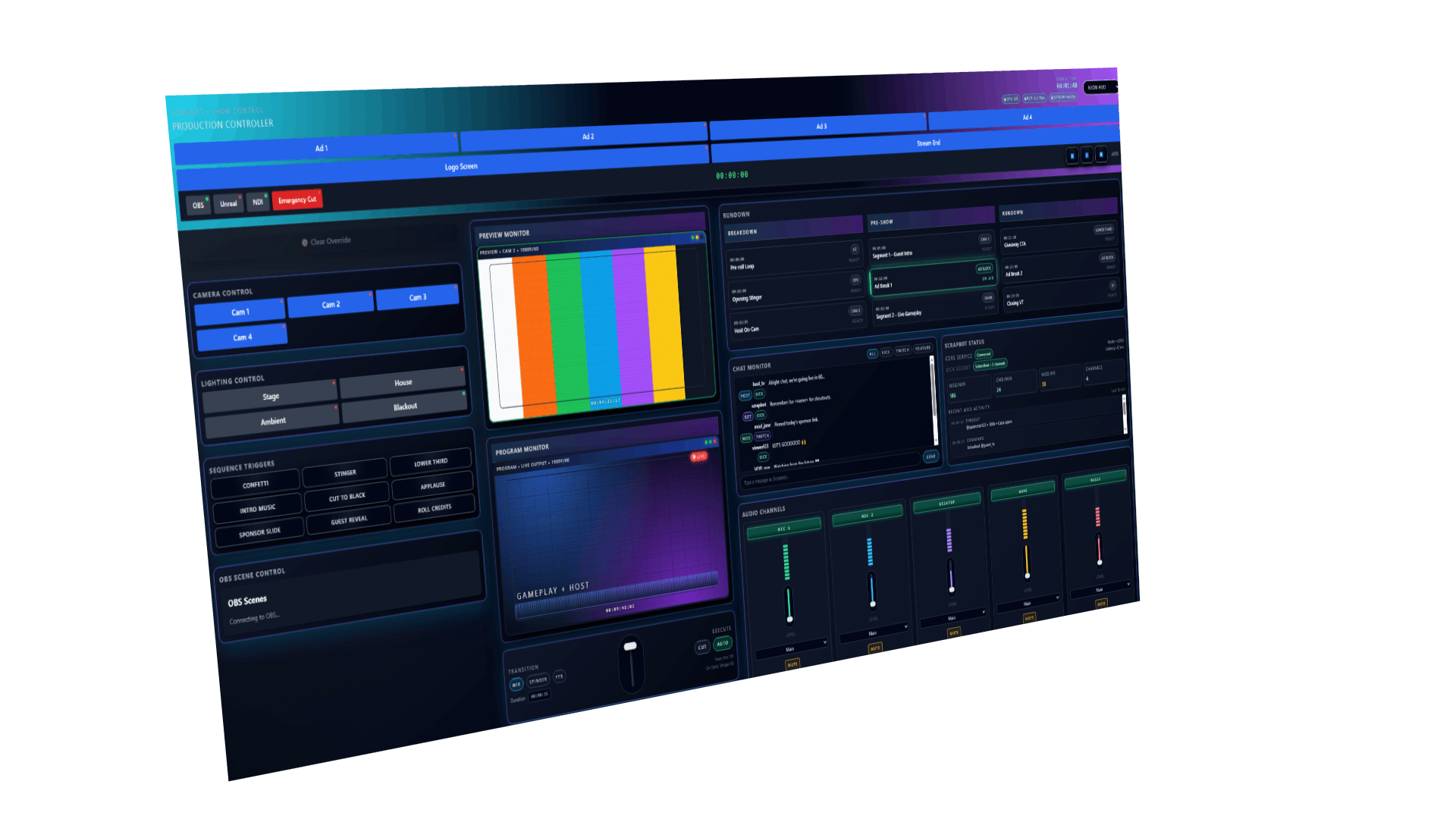
Trigger key overlays, scene presets and show moments from one surface that's designed for live usage, not for "somewhere in a settings menu".
KICK · TWITCH · YOUTUBE · OVERLAYS · BOT · STATS
Scraplet is your live control room. Overlays, Scrapbot, chat, alerts and stats wired into a single surface, so you're not juggling twelve tabs while you're supposed to be entertaining.
Built for live shows, raids and scuffed nights – not static landing pages.
WHY SCRAPLET EXISTS
Your show actually happens in a tiny window of time: raids hit, chat spikes, sponsors ping, someone redeems something cursed. That's when the default “twelve-tab” setup collapses.
Scraplet pulls the critical levers into one place — so scenes, overlays, Scrapbot and call-to-actions are always in reach, even when everything is on fire.
Trigger key overlays, scene presets and show moments from one surface that's designed for live usage, not for "somewhere in a settings menu".
Scrapbot isn't just “also installed” — it's aware of your overlays and show flow. Shoutouts, custom commands and actions live beside the controls that trigger them.
CCV, follow spikes, stream health and sponsorship-worthy moments framed around how Kick actually works — not generic "analytics" graphs.
Raids, donos, chat spam, last-minute reads — Scraplet stays legible and predictable under pressure, so you can perform instead of firefight your UI.
THE SCRAPLET ECOSYSTEM
Overlay triggers, shoutouts, call-to-actions, raids and show moments — Scrapbot is the automation layer wired directly into your dashboard. It sees what you see, so your tools don’t lag behind the show.
Scrapbot doesn’t exist in a vacuum. It can update your overlays, trigger show assets, swap lower-thirds, fire CTAs and control action panels directly using triggers you set in its configuration. What's more, Scraplet is the conduit for our raw processing power when it comes to stats. Nothing escapes Scrapbots weapons-grade telemetry.
Raids, donos, spikes in chat volume — Scrapbot reads channel events through official APIs in real time, and exposes the right tools inside your dashboard when things start moving fast. When the show is over, kick back and get into all the insights Scrapbot surfaced during your stream with our realtime analytics dashboards.
Lightweight, predictable and highly configurable. Scrapbot is a real personality but will gladly take the backseat and ensure your show runs flawlessly. With moderation abilities and realtime sentiment analysis, Scrapbot has the pulse of your show without ever becoming the show.
Scrapbot listens, the overlays display, and the dashboard controls it all. It’s the first time your tools aren’t competing — they’re collaborating.
Add Scrapbot to your channel →Scrapbot is optional, but it unlocks the best parts of Scraplet.
HOW SCRAPLET FITS IN
You still run OBS, your usual alerts and your channel bots if you want to. Scraplet becomes the panel that ties them together — the thing you keep open on a second monitor or tablet while you're live.
Kick-first today, comfortable with Twitch and YouTube as you grow.
No scene collection rewrites — Scraplet talks to what you already use.
Designed to be safe to add mid-season without burning everything down.
CONNECT
Sign in with Kick so Scraplet knows who you are and which channel to care about. This links your creator profile, basic stats and the permissions Scrapbot will use later.
Coming next: optional Twitch and YouTube hooks for hybrid setups.
WIRE IT IN
Invite Scrapbot to your channel, add Scraplet overlays as browser sources in OBS and map the important actions — shoutouts, CTAs, scene presets — to panels inside the dashboard.
Nothing breaks if you keep your old alerts and bots while you try it.
GO LIVE
When you go live, Scraplet becomes the place you glance at: scenes, Scrapbot commands, overlays, sponsor moments and key metrics live in one layout so you can focus on the show instead of the admin.
The goal: fewer "one sec chat, I'm fixing something" moments.
WHO SCRAPLET IS FOR
Not “go live once and forget about it” streamers. Scraplet is for people who treat their channel like a real show — whether you're still small or already pulling serious CCV.
FINDING YOUR FOOTING
You're still figuring out your format, but you already know you hate scrambling between overlays, audio, bots and chat. Scraplet gives you a grown-up layout from day one.
GROWING THE SHOW
You're juggling sponsors, recurring segments and regular stream nights. You need a dashboard that doesn't fall apart when three things happen at once — and a bot that's in on the plan.
DIALED-IN OPERATIONS
You already have a working tech stack and probably a mod team. Scraplet gives you a central control panel for operators while keeping the on-camera talent focused on the show.
Scraplet gives you a stable control surface for stream nights — scenes, overlays, Scrapbot and key stats wired into one layout. No more firefighting your setup mid-show.
Typical setup: around 10–15 minutes with OBS and a Kick channel.
No FOMO funnels, no countdowns — just tools that make live shows easier.